Labels

Showing posts with label PHONE AND ANDROID HACKS. Show all posts

Thursday, 5 July 2012

INSTALL PAID ANDROID APPS AND GAMES FOR FREE..


  FREE DOWNLOAD PAID APPS AND GAMES OF ANDROID OF ANDROID


Android, developed by Google is the most widely used mobile operating system that has more then 450,000 application. But all the applications are not free, some of them cost less and some cost quite a lot. Buying all of your favorite apps is not economically feasible. And hence we found two great apps which will let you download and install paid android apps absolutely free. The two apps are Applanet and BlackMart. You just need to install any or both of these applications to enjoy unlimited android apps and games for free.
Enable Your Device To Install From Unknown Sources :
If you have not enabled installation of applications from unknown sources on your Android device before, then read on. Otherwise skip this. 
An Android device is set to block installation of applications from unknown sources. Unknown source here typically means any source other than Google Play (Android Market). So in a situation where you need to install an application by transferring it from any other device like your computer, you need to unblock it. This can be done easily. Just follow these steps below.
1.       Click the “Menu” button on your home screen.
2.      Go to “Settings”.
3.      Now go to “applications” tab.
4.      Now tick the “Unknown sources” option.
That’s it. Now you can install any application from outside the Google Market also.

Installing and Using Applanet :


Installing applanet is not at all hard. Just download the Applanet app. Transfer it to you phone or tablet or any other Android device through data cable or Bluetooth or any other supported transfer medium. Now enable installation from unknown sources and install the app on your device.
After installation just run the app from the menu. You will see a screen as shown on the right side. The interface is quite similar to the Google Play Store or the Android Market. On the top right you will have a search option, that allows you to search for any application, game or any stuff within the Applanet database. Till date Applanet has 15000+ apps in its database. You have to pay absolutely nothing for any full version paid app you download. Below the search button you will have three buttons, one for Applications which allows you to browse applications, second one for Games and the third for keeping an eye on your downloads. The games are also categorized on the basis of their genre and you can browse through them according to your own interest. So download Applanet app from here anddownload paid apps for free on your Android device. Click on the image to see a larger version of the screenshot.

Installing And Using BlackMart :

The installation of BlackMart is exactly similar to Applanet. You have to first download the app fromhere. Now allow installation from unknown sources, then transfer the downloaded file to you Android device. After transferring the file, navigate to the file and install it. Now open the BlackMart application. You will see a screen as shown on the right side. The application interface is also similar to that of Google Play and Applanet. Applications and Games are arranged in different sections. The installed section shows the applications currently installed on your device and also if an update is available for any of your installed application. The only difference between the Applanet and BlackMart is when you download an application with Applanet, it automatically installs in your device, but when you download an application with BlackMart, it shows a notification in the notification tray that the application is downloaded and click here to install it. It requires just one additional click and nothing else. BlackMart also has a very vast database of best android apps and games and you can download any number of android apps for free using BlackMart.
ENJOY THE HACK FREE DOWNLOAD


Sunday, 10 June 2012

COMPRESS 1GB FILE INTO 10MB

    HEY  TODAY IAM GOING TO COMPRESS 1GB INTO 10MB        

Hello, New KGB Archiver open source software according to post title it compresses 1GB file to 10MB file. It used PAQ6 algorithm which has AES-256 powerful encryption. It is available for both Windows and Linux operating system. Compression ratio of this software is very high. Due to high compression levels, time to compress a file goes high as the size of the file increases and compression ratio may vary depending on the format of the file.


The KGB compression format makes a fool of the famous 7z and RAR by managing a compression ratio that is really high even in formats that are already compressed like JPEG images and DivX files. According to various standard tests,the compression ratio improves nearly 20% in comparison with its direct competitors.
SYSTEM REQUIREMENT:

·                     256 MB RAM
·                     1.5 GHz Processor
 FEATURES:

·                     Supports native .kgb files and .zip files
·                     AES-256 Encryption
·                     Able to create self-extracting archives.
·                     Multilanguage supports like Arabic, German, Greek, Japanese, Spanish many more.
·                     Unicode is supported in both User Interface and File Systems.
·                     An Explorer shell extension is available for the windows version.
·                     Make Password protected compressed file.
 File compressed by KGB Archiver save with own extension and at the time of decompression it automatically recognizes the file format. The only limitation of KGB archiver is, decompressed file cannot be open or extract with other compression softwares. 


Note:
1. This KBG Archiver software cannot compress video format files.
2. If you are compressing any file with KGB archiver and sending the comprssed file to your friends then he must have KBG archiver installed on his computer to decompress the file.
 CLICK BELOW TO DOWNLOAD KGB ARCHIEVER FOR FREE

DOUBLE YOUR MEMORY CARD SPACE

    CONVERT  YOUR  2GB MEMORY CARD TO 4GB            

Memory cards are used in many electronic items, like computers, digital camera, mobile phones, and mp3 players. Everyone uses memory cards to store data, but what if you bought a card some days ago and now you feel that this is not enough to fulfill your needs. We have a solution for you; you can convert your 1GB memory card into 2GB with the help of free software.
You just have to follow the given instructions to upgrade your card. After completing the procedure, you will be amazed to see that your 1GB card is storing data according to 2GB memory. Before following the instructions, make sure that you have a 1GB memory card because the application works only on 1GB cards.


1. Insert the memory card to your PC.

2. Keep a back up of all the data from the memory card, because first you have to format the card.

3. Download and install Skymedi software CLICK HERE TO DOWNLOAD

4. After installation, the application will launch automatically showing a windows with options “Fix
and “Cancel”. From the drop down menu, you have to browse the memory card.


5. Once you select the location of the card, click on “Fix”, it will ask you for the confirmation, you have to click on “Yes”. After selecting the memory card, the application will show you a size of around 955MB; this is because you have inserted a 1GB memory card.

6. After finishing the process, the application will ask you to unplug the memory card. Remove it and insert it again. Now the storage capacity of the memory card is increased to 2GB.
7. If you want to check the storage of the memory card you can click on My computer --> Memory card --> Select Properties. You will see that the size of the memory card is 2GB. If you are using Windows Vista7, you will see “Computer” instead of “My computer”. Open that right clicks on the memory card, select properties and you will be able to check the size of the memory card.

8. There is one more way to confirm the storage capacity. Reopen the Skymedi and select the location of the memory card. This time it will show 1912KB, which is 2GB.


Conclusion:
With the help of the software and instructions given above, you can double the storage capacity of your 1GB memory card. If you will buy a 2GB card you have to pay some dollars extra, but this will not make any effect on your pocket because the software is for free.

Note : There is possibility that the software may not work on some of the memory cards, if this does not work in the first time. Do not try it repeatedly. It can result into damage in the memory card.
........ENJOY THE HACK.....

COMENTS ARE WELLCOME

Saturday, 9 June 2012

SOFTWARE FOR RECOVORING LOST PASSWORDS FOR FACEBOOK AND GMAIL


How to Recover a lost password of your facebook and Gmail account
WebBrowserPassView is a password recovery tool that reveals the passwords stored by the following Web browsers: Internet Explorer (Version 4.0 – 9.0), Mozilla Firefox (All Versions), Google Chrome, and Opera. This tool can be used to recover your lost/forgotten password of any Website, including popular Web sites, like Facebook, Yahoo, Google, and GMail, as long as the password is stored by your Web Browser.
JUST SELECT THE PROCESS AND FOLOW THE INSTRUCTIONS STEP BY STEP.
THEN I WILL BE DONE ALLMOST.
DOWNLOAD THE SOFTARE BELOW:

Saturday, 2 June 2012

SMS SPOOFINF SERVICE


      SEND SMS FROM ANY NUMBER TO ANY NUMBER      


Well here I am sharing one amazing post about sms spoofing. Using this technique you can send SMS from any number to any number and you can also update the status of any facebook account if the victim have active that service.This post is educational purpose only I am not responsible for anything. 
fake-sms-sender

Lets start..
Smsglobal is an amazing website to send SMS. However, it is a premium site from Australia.But they only allow to send 25 fake SMS at the time of signing up there. So, you can send only 25 Fake SMS using this service . After that, you have to try signing in with a new number and Email ID.
just open this link http://smsglobal.com/signup/signup_page.php and sign up there.
Now fill the form as shown below in the image.
fake sms 11 by hacks-crazy.blogspot.com
After signing in, you will receive your username and password on your phone.
  • Now login in your SMS global Account with your provided Username and Password. 
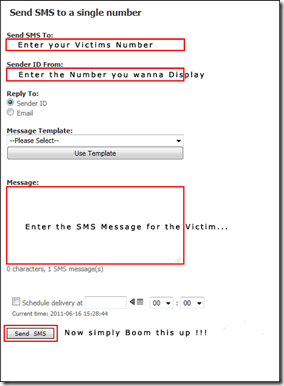
  • After loging in, you will see the welcome screen, just click on Send SMS to Number as shown below.
  • fake sms 22 by hacks-crazy.blogspot.com
First remove the sender ID while sending to send a spoofed SMS after that enter the mobile number of both the victim and now you can send a spoofed SMS as shown below.
fake sms 33 by hacks-crazy.blogspot.comSo, Enjoy Sending fake SMS to any of the number , and now you can update any buddy’s facebook status using this technique!!
Please do not misuse this trick, This article is just for educational purposes. I am not responsible for any consequences taking place!!!

HOW TO UPGRADE YOUR ANDROID PHONE


    TRICKS N TIPS ON HOW TO UPGRADE YOUR ANDROID PHONE


The biggest problem with the Androidplatform has been how slowly many phone makers release the latest version of the OS for their older models. It's also not unusual for them to never do so. (A company may not want to spend resources on phones they no longer sell; or, they and the carrier for a particular model may not agree on when to provide an update.) 

If you own such a neglected phone, and don't want to buy a new one, then your best shot is installing unofficial Android firmware on it.

The following is a primer on what you should know about the process of installing unauthorized Android firmware. Each phone can have its own unique steps for doing this, so you should follow instructions for your specific model.

1. INSTALL AT YOUR OWN RISK

Installing unofficial OS firmware on your phone will likely render whatever warranty from its maker you have on it null and void.

Thoroughly read the installation instructions for your specific phone model and then follow them carefully, taking time and patience. Though the odds of bricking your phone -- rendering it inoperable because of something going wrong during the install process -- is fairly low, it can happen and especially so if you rush through things.

Be aware that some features on your phone running its current version of Android may no longer be available after you successfully install a custom Android firmware. Other features could be buggy or have quirks.

2. TWO CHOICES: CYANOGENMOD OR MIUI

In the unofficial Android firmware development community, there are two major choices:CyanogenMod and MIUI. Both are built on the Android source code officially released by Google, and their latest versions are based on Android 2.3 (codenamed Gingerbread). As of this writing, the volunteer development teams of both projects are working to get new versions built on Android 4.0 ("Ice Cream Sandwich").

What's the difference between the two? CyanogenMod sticks with the basic, default components of Android that come with its source code release; its UI is "clean," devoid of unnecessary extras. MIUI completely overhauls the stock Android UI with one that resembles that of Apple's iOS.

If your Android phone is (or was) a popular model, it is probably supported by either theCyanogenMod or MIUI community.

If not, there is still a chance that somebody may be working on a port for your specific phone; search its model name in the official community forums for CyanogenMod or MIUI to see if there is such an on-going effort. (An excellent source to check is Android Forums.) But know that some or several features of your phone may not work if you install such an experimental, work-in-progress build of CyanogenMod or MIUI that is not officially sanctioned by that OS's community.

3. ROOT YOUR PHONE

Before you can start to do anything to your phone, you'll need to root it, which means basically to unlock the security settings put in place in the OS to prevent it from being altered. Check out GingerBreak to help you conveniently root your phone. 

Unfortunately, this app tool might not work on more recent Android phones. This guide provides a list of instructions for rooting several specific phone models.

4. BACK UP YOUR CURRENT FIRMWARE AND PHONE DATA

You really want to do this if you need to re-install your phone's original firmware and data later (e.g., something goes wrong when you install the unofficial Android firmware; you decide you don't like CyanogenMod or MIUI; or, you need to reactivate your phone with its carrier, something which you cannot do when running either of these unofficial OSs on it).

The easiest way to do a back-up is to install ClockworkMod ROM Manager on your phone. Run this app, and select "Reboot into Recovery" from its menu. This downloads and installs a recovery image profile for your phone, restarts it, and loads a plain-looking text menu, where you can select the back-up process.

After the copy of your phone's firmware and data is made, you can move it to a computer for safekeeping. Connect your phone by USB cable to your computer, then simply drag-and-drop the backup's folder (it's on your phone's SD card under the folder "clockworkmod") from your phone's SD card to the latter device.

5. PREPARE GOOGLE'S DEFAULT ANDROID APPS FOR INSTALLATION

If you're installing CyanogenMod: Unless you want to keep your to-be-upgraded phone clean of Google apps, you'll need to install them separately. CyanogenMod does not include the standard Google apps that typically come pre-installed on an Android phone. So you'll have to download a ZIP file that contains the installation packages for apps such as Google Search and, most importantly, the Android Market. Put this ZIP in the main root directory of your phone's SD card.


6. INSTALL THE CUSTOM ANDROID FIRMWARE

This is the big deal. Download the CyanogenMod or MIUI firmware designed specifically for your phone model, which comes in the form of a ZIP package, and save it in the root directory of your phone's SD card.

Once again, run the ClockworkMod ROM Manager app, and select "Reboot into Recovery." After your phone restarts into the ClockworkMod Recovery tool, you may need to wipe out its data and cache, and format its "/system" directory -- this depends on whether you are installing CyanogenMod or MIUI, so you should refer to the instructions that specifically are for your phone.

Next, you select the ZIP file of the custom Android firmware you placed in the root directory of your phone's SD card, and start the upgrade process. It normally takes less than two minutes. If you're upgrading to CyanogenMod: Don't reboot your phone just yet... repeat the above step for the ZIP file containing the Google Android apps.

You return to the main menu of the ClockworkMod Recovery tool and select to reboot your phone. After about 2 minutes, it should boot and then run on the custom Android firmware.

7. ENJOY YOUR NEW ANDROID PHONE!

Besides updating your phone to a more recent version of Android, CyanogenMod and MIUI can also give it new features and tools, which include better power management, Wi-Fi tethering, stronger security settings, and broader personal customization of the UI. Many users report their phones run faster with one of these unofficial OSs than with the version of Android that came originally installed on it.

Friday, 1 June 2012

How to Spoof Caller ID – Caller ID Spoofing


How to Spoof Caller ID – Caller ID Spoofing


Caller ID SpoofingCaller ID spoofing is the act of making the telephone network to display any desired (Fake) number on the recipient’s Caller ID display unit instead of the original number. The Caller ID spoofing can make a call appear to have come from any phone number that the caller wishes.
Have you ever wondered how to perform Caller ID spoofing? Read on to know more information on how to spoof Caller ID.
Unlike what most people think, an incoming call may not be from the number that is displayed on the Caller ID display unit. Because of the high trust that the people have in the Caller ID system, it is possible for the caller to easily fool them and make them believe that the number displayed on the Caller ID display is real. This is all possible through Caller ID spoofing.
 

How to Spoof Caller ID?

 
You can easily spoof any Caller ID using services like SpoofCard. In order to use the spoofcard service, you need to pay in advance and obtain a PIN (Personal Identification Number) which grants access to make a call using the Caller ID spoofing service. Once you have purchased the service, you will be given access to login to your SpoofCard account. To begin with, you need to call the number given by SpoofCard and enter the PIN. Now you will be given access to enter the number you wish to call and the number you wish to appear as the Caller ID.
Once you select the options and initiate the calling process, the call is bridged and the person on the other end receives your call. The receiver would normally assume that the call was coming from a different phone number ie: the spoofed number chosen by you - thus tricking the receiver into thinking that the call was coming from a different individual or organization than the caller’s. In this way, it becomes just a cakewalk to spoof Caller ID and trick the receiver on the other end. Thus, you neither need to be a computer expert nor have any technical knowledge to spoof caller ID. For more information on SpoofCard service visit the following link.
 
SpoofCard - Caller ID Spoofing Service

How Caller ID Spoofing works?

 
Caller ID spoofing is done through various methods and using different technologies. The most commonly used technologies to spoof Caller ID is VOIP (Voice Over IP) andPRI (Primary Rate Interface) lines.
Today most VOIP systems provide an option for it’s users to enter whatever number they want in the calling party field and this number is sent out when they make a call. Hence it is easily possible for any user to spoof Caller ID provided they have a VOIP system and know how to properly configure it to spoof the Caller ID. However sites like SpoofCard provide an easy and cheap spoofing services for those who aren’t using VOIP systems that they can configure themselves.
Caller ID spoofing is possible and being performed right from the days Called ID system was introduced. However most people are unaware of the fact that it is possible to spoof  Caller ID and make any number to be displayed on the receiver’s end. In the past, Caller ID spoofing service was mostly used by telemarketers, collection agencies, law-enforcement officials, and private investigators. But today, it is available to any Internet user who wish to spoof caller ID.

BLUE JACKING HARMLESS PRANK


Bluejacking - harmless prank


Bluejacking is a type of prank played with Bluetooth devices which takes advantage of a loophole in bluetooth technology to send unsolicited messages to other nearby Bluetooth devices whose bluetooth is on. Bluejacking term did not come from Bluetooth and hijacking. In this trick, bluejacker is not hijacking anything.Bluejacking was first done by Malaysian IT consultant.He dericed Bluejacking from Bluetooth and ajack. Ajack was his username on Esato, a Sony Ericsson fan online forum. 
Bluetooth is a wireless transmission technology which has slow data transfer speed and has limited ranges. It reaches around 10 metres or 32.8 ft on mobile phones, PDAs, and 100 metres (328 ft) in laptops.
In Bluejacking, a bluetooth enabled device sends a vCard to another bluetooth enabled device via the OBEX protocol. Here vCard typically contains a message in the name field (i.e. for bluedating or bluechat). vCard is a special file format standard for electronic business cards.
Usually a bluejacker can only send a text message with this flaw. But modern phone allows users to send images or sounds as well. 
There are many tools developed for Blujacking. Most of the tools were developed by  individual developers with specific functions.


NOTE: Bluejacking is harmless and mainly used for advertising on other devices. But people who do not know about this think that their phone is infected or malfunction. Blujacker can only send a message or sound and image in modern phones. Bluejacker will not be able to take over your phone or steal your personal information. 


Bluejacking tools:


http://www.bluejackq.com/freejack.jar