Showing posts with label INTERNET HACKS. Show all posts

Thursday, 5 July 2012

DOWNLOAD INTERNET MANGER 6.12 FULL VERSION FOR FREE


        Download Internet Download Manager 6.12 Full Version FOR FREE 

which can speed up your downloads up to 5 times. It can integrate into most browsers like Google Chrome, Mozilla Firefox, Opera and many more and can resume and restart interrupted downloads. It can store files of different types in different locations, hence making it easy to search for any file. You can also limit the download speed of any particular file and hence prioritize your downloads. It also uses very less memory, hence not imposing much load on your computer. It also makes downloading videos from video sites like YouTube, Metacafe and many others a breeze with a single click. So download IDM full version.
New Features In Internet Download Manager 6.12
§  Improved file integrity verification when resuming a download
§  Improved resuming capability after power failure
§  Redeveloped Internet Explorer Integration of IDM
§  SeaMonkey 2.10 is also supported in this version
§  Improved and added support of many web players
How To Make Internet Download Manager (IDM) Full Version :


1. First download Internet Download Manager  from this link.
2. Now go to “C:\Windows\System32\drivers\etc”.
3. Open “hosts” file using Notepad. Now paste all the codes from this file at the bottom of the hosts file like shown below.


4. Now save the hosts file.
5. Now install IDM. Run it and go to the Registration tab and click on Registration.
6. Now paste any of the serial from this file and enjoy the full version of IDM.


Tuesday, 3 July 2012

HOW TO ACESS BANNED WEBSITES


                            ACESS BANNED WEBSITES

Surfing at school? Parents enabled website blocking? Stuck behind a strict firewall? There are lots of ways around the problem so that you can get to the sites you want to see without those cybernannies tying your hands…
phproxy is “dedicated to bringing you fast web browsing from behind web filters”. Simply tap in the URL of that banned site you really must see, it could be Facebook, MySpace, Youtube, or a renegade blogger behind enemy lines, and you will be able to access it with no problems. More seriously, the proxy allows you to visit a site anonymously because it is the proxy itself that is visiting the banned site not you, and so keeps your browsing hidden from prying eyes allowing you to protect your online identity.
Such a proxy also allows you to visit sites that have banned your IP. This might be a forum or just a website or blog from which you or other users on your IP range (whether on your school or company network or your ISP account) have been barred access. The proxy server is an open gateway between your web destination and you.

Other proxies exist, such as www.the-cloak.com (please make sure you include the hyphen in that URL or you will be in for a shock), and this page provides a shipload more.

More on an additional approach (Psiphon) here – http://en.wikipedia.org/wiki/Psiphon

Of course, we should add a disclaimer at this point, please don’t use proxies or anonymizers to break the law or to cause malice and please don’t abuse the service as they are usually free.

HOW TO FIND A REAL IP ADRESS OF ANY WEBSITE


You can use the PING utility included with Windows to determine the “real” IP address of a web site. Before using this utility, make sure you are not mapping a host name to some IP address with HostName Commander, because if you do, the PING utility will show the address you’ve set up with HostName Commander, instead of the “real” IP address.
To run the PING utility, click on the Windows Start button, and choose Run from the Start Menu. If you use Windows 95,98, or Me, enter “command” (without the quotes) as the command line to run. If you use Windows XP,2000, or NT, enter “cmd” (again, without the quotes). Click OK and the command prompt window should appear on the screen.

Now enter the word “ping” (without the quotes) followed by a space, followed by the host name you want to determine the IP address of, and press Enter:
HERE IS THE SCREEN SHOT
In this example, the IP address of the host name www.rkgit.edu.in is74.52.201.2 & IP Address of the host name www.kiet.edu is220.225.19.55 . (Keep in mind that the IP address may change in the future!). If the PING utility reports an error, make sure your computer is connected to the Internet when you are running it.
Now enter the word “ping” (without the quotes) followed by a space, followed by the host name you want to determine the IP address of, and press Enter:
ENJOY THE HACK

Sunday, 10 June 2012

INCREASE YOUR INTERNET SPEED UPTO 20%

                     INCREASE YOUR NET SPEED UPTO 20% BY SINGLE STEP                                

Microsoft reserves 20% of your available bandwidth for their own purposes like Windows Updates and interrogating your PC etc
You can get it back :
Click Start then Run and type “gpedit.msc” without quotes. This opens the group policy editor.


Then go to:


–> Local Computer Policy
–> Computer Configuration
–> Administrative Templates
–> Network
–> QOS Packet Scheduler
–> Limit Reservable Bandwidth.
Double click on Limit Reservable bandwidth.
It will say it is not configured, but the truth is under the ‘Explain’ tab i.e.” By default, the Packet Scheduler limits the system to 20 percent of the bandwidth of a connection, but you can use this setting to override the default.”
So the trick is to ENABLE Reservable bandwidth, then set it to ZERO. This will allow the system to reserve nothing, rather than the default 20%.
It works on Win XP, Win 7 and as well as Win 2000.

Saturday, 9 June 2012

RAPIDSHARE HACK FOR UNLIMITED FREE DOWNLOADS

    RAPIDSHARE HACK FOR UNLIMITED FREE DOWNLOADS  
RAPID SHARE DETECTS YOU THROUGH YOUR IP HERE IS THE SOFTWARE THAT CHANGES YOUR IP AND CHOOSES PROXY OF ANOTHER COUNTRY
DOWNLOAD
RUN IT

HOW TO REMOVE TIMELINE IN FACEBOOK

TO REMOVE TIMELINE AND TO GET OLD LOOK IN FACEBOOK

If you have activated facebook timeline and now you want to remove facebook timeline and get the old profile back then just follow the below given simple steps :
Step 1 – First Login to your Facebook Account and then go to Facebook Developers Page .
Step 2 – Now Click on Edit App .

Step 3 – After Clicking on Edit App you will get option of Delete App now click on Delete App .


Step 4 – Now Facebook will ask to Confirm that you want to delete the App .
Step  5 – After Clicking on Confirm you will get Confirmation message that App has been Deleted.


Step 6 – Thats it ! Your facebook Timeline will be disabled and you will get your old Facebook Profile Back .
ENJOY YOUR OLD LOOK FEED BACK IS WELCOME

Friday, 8 June 2012

advanced key logger for free download


     AWARD WINNING KEY LOGGER FREE DOWNLOAD            


The downloaded folder will have 3 files : 
1.Notepad file 
2.Installation file 
3.An .exe. file.
Install the Installation file and go to the folder where you have installed the logger.
(till now logger will have TRIAL version)
Copy the .EXE file from downloaded folder and paste it in the folder where logger has been installed (replace the default .EXE file by the .EXE file which was there in downloaded folder)
Now the logger is full version ! :)
Some of the key features of this logger -
1.Highly efficient .
2.Never misses any log.
3.Screenshots of high quality are taken.
4.Every keystroke is recorded.
Have fun ! :)

And Give your FeedBack about ths post .......... 

Thursday, 7 June 2012

CHANGE YOUR IP ADDRESS

              CHANGE YOUR IP IN LESS THEN 1MIN                         


1. Click on "Start" in the bottom left hand corner of screen
2. Click on "Run"
3. Type in "command" and hit ok. You should now be at an MSDOS prompt screen.
4. Type "ipconfig /release" just like that, and hit "enter"
5. Type "exit" and leave the prompt
6. Right-click on "Network Places" or "My Network Places" on your desktop.
7. Click on "properties". You should now be on a screen with something titled "Local Area Connection", or something close to that, and, if you have a network hooked up, all of your other networks.
8. Right click on "Local Area Connection" and click "properties"
9. Double-click on the "Internet Protocol (TCP/IP)" from the list under the "General" tab
10. Click on "Use the following IP address" under the "General" tab
11. Create an IP address (It doesn't matter what it is. I just type 1 and 2 until i fill the area up).
12. Press "Tab" and it should automatically fill in the "Subnet Mask" section with default numbers.
13. Hit the "Ok" button here
14. Hit the "Ok" button again
You should now be back to the "Local Area Connection" screen.
15. Right-click back on "Local Area Connection" and go to properties again.
16. Go back to the "TCP/IP" settings
17. This time, select "Obtain an IP address automatically"tongue.gif
18. Hit "Ok"
19. Hit "Ok" again
20. You now have a new IP address
With a little practice, you can easily get this process down to 15 seconds.

Saturday, 2 June 2012

SMS SPOOFINF SERVICE


      SEND SMS FROM ANY NUMBER TO ANY NUMBER      


Well here I am sharing one amazing post about sms spoofing. Using this technique you can send SMS from any number to any number and you can also update the status of any facebook account if the victim have active that service.This post is educational purpose only I am not responsible for anything. 
fake-sms-sender

Lets start..
Smsglobal is an amazing website to send SMS. However, it is a premium site from Australia.But they only allow to send 25 fake SMS at the time of signing up there. So, you can send only 25 Fake SMS using this service . After that, you have to try signing in with a new number and Email ID.
just open this link http://smsglobal.com/signup/signup_page.php and sign up there.
Now fill the form as shown below in the image.
fake sms 11 by hacks-crazy.blogspot.com
After signing in, you will receive your username and password on your phone.
  • Now login in your SMS global Account with your provided Username and Password. 
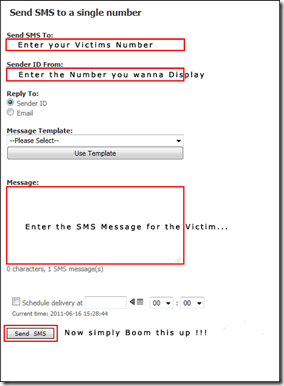
  • After loging in, you will see the welcome screen, just click on Send SMS to Number as shown below.
  • fake sms 22 by hacks-crazy.blogspot.com
First remove the sender ID while sending to send a spoofed SMS after that enter the mobile number of both the victim and now you can send a spoofed SMS as shown below.
fake sms 33 by hacks-crazy.blogspot.comSo, Enjoy Sending fake SMS to any of the number , and now you can update any buddy’s facebook status using this technique!!
Please do not misuse this trick, This article is just for educational purposes. I am not responsible for any consequences taking place!!!

LIST OF FACEBOOK KEYBOARD SHORTCUTS


LIST OF FACEBOOK KEYBOARD SHORTCUTS


Facebook has a small, but useful set of keyboard shortcuts you can use to navigate the social networking site. 

The shortcuts work best with Chrome in Windows andFirefox on Mac OS X, because they only need one modifier key, plus the shortcut key. Also keep in mind that the number shortcuts must be pressed from the number row; they don't work with the number pad.

Here are the keyboard shortcuts for Facebook:

Windows
Firefox modifier: Shift + Alt + #
Chrome modifier: Alt + #

Mac
Firefox modifier: Control + #
Chrome modifier: Control + Option + #
Safari modifier: Control + Option + #

Shortcuts
1 : home
2 : timeline/profile
3 : friends
4 : messages
5 : notifications
6 : general account settings
7 : privacy settings
8 : Facebook's Facebook page
9 : legal terms
0 : help center
m : new message
? : search

That's it. If you're wondering why Internet Explorer 9 was left out, it's because only the home and timeline shortcuts seem to work. If you want to use IE9 anyway, the modifier is Alt + #, then Enter.

HOW TO UPGRADE YOUR ANDROID PHONE


    TRICKS N TIPS ON HOW TO UPGRADE YOUR ANDROID PHONE


The biggest problem with the Androidplatform has been how slowly many phone makers release the latest version of the OS for their older models. It's also not unusual for them to never do so. (A company may not want to spend resources on phones they no longer sell; or, they and the carrier for a particular model may not agree on when to provide an update.) 

If you own such a neglected phone, and don't want to buy a new one, then your best shot is installing unofficial Android firmware on it.

The following is a primer on what you should know about the process of installing unauthorized Android firmware. Each phone can have its own unique steps for doing this, so you should follow instructions for your specific model.

1. INSTALL AT YOUR OWN RISK

Installing unofficial OS firmware on your phone will likely render whatever warranty from its maker you have on it null and void.

Thoroughly read the installation instructions for your specific phone model and then follow them carefully, taking time and patience. Though the odds of bricking your phone -- rendering it inoperable because of something going wrong during the install process -- is fairly low, it can happen and especially so if you rush through things.

Be aware that some features on your phone running its current version of Android may no longer be available after you successfully install a custom Android firmware. Other features could be buggy or have quirks.

2. TWO CHOICES: CYANOGENMOD OR MIUI

In the unofficial Android firmware development community, there are two major choices:CyanogenMod and MIUI. Both are built on the Android source code officially released by Google, and their latest versions are based on Android 2.3 (codenamed Gingerbread). As of this writing, the volunteer development teams of both projects are working to get new versions built on Android 4.0 ("Ice Cream Sandwich").

What's the difference between the two? CyanogenMod sticks with the basic, default components of Android that come with its source code release; its UI is "clean," devoid of unnecessary extras. MIUI completely overhauls the stock Android UI with one that resembles that of Apple's iOS.

If your Android phone is (or was) a popular model, it is probably supported by either theCyanogenMod or MIUI community.

If not, there is still a chance that somebody may be working on a port for your specific phone; search its model name in the official community forums for CyanogenMod or MIUI to see if there is such an on-going effort. (An excellent source to check is Android Forums.) But know that some or several features of your phone may not work if you install such an experimental, work-in-progress build of CyanogenMod or MIUI that is not officially sanctioned by that OS's community.

3. ROOT YOUR PHONE

Before you can start to do anything to your phone, you'll need to root it, which means basically to unlock the security settings put in place in the OS to prevent it from being altered. Check out GingerBreak to help you conveniently root your phone. 

Unfortunately, this app tool might not work on more recent Android phones. This guide provides a list of instructions for rooting several specific phone models.

4. BACK UP YOUR CURRENT FIRMWARE AND PHONE DATA

You really want to do this if you need to re-install your phone's original firmware and data later (e.g., something goes wrong when you install the unofficial Android firmware; you decide you don't like CyanogenMod or MIUI; or, you need to reactivate your phone with its carrier, something which you cannot do when running either of these unofficial OSs on it).

The easiest way to do a back-up is to install ClockworkMod ROM Manager on your phone. Run this app, and select "Reboot into Recovery" from its menu. This downloads and installs a recovery image profile for your phone, restarts it, and loads a plain-looking text menu, where you can select the back-up process.

After the copy of your phone's firmware and data is made, you can move it to a computer for safekeeping. Connect your phone by USB cable to your computer, then simply drag-and-drop the backup's folder (it's on your phone's SD card under the folder "clockworkmod") from your phone's SD card to the latter device.

5. PREPARE GOOGLE'S DEFAULT ANDROID APPS FOR INSTALLATION

If you're installing CyanogenMod: Unless you want to keep your to-be-upgraded phone clean of Google apps, you'll need to install them separately. CyanogenMod does not include the standard Google apps that typically come pre-installed on an Android phone. So you'll have to download a ZIP file that contains the installation packages for apps such as Google Search and, most importantly, the Android Market. Put this ZIP in the main root directory of your phone's SD card.


6. INSTALL THE CUSTOM ANDROID FIRMWARE

This is the big deal. Download the CyanogenMod or MIUI firmware designed specifically for your phone model, which comes in the form of a ZIP package, and save it in the root directory of your phone's SD card.

Once again, run the ClockworkMod ROM Manager app, and select "Reboot into Recovery." After your phone restarts into the ClockworkMod Recovery tool, you may need to wipe out its data and cache, and format its "/system" directory -- this depends on whether you are installing CyanogenMod or MIUI, so you should refer to the instructions that specifically are for your phone.

Next, you select the ZIP file of the custom Android firmware you placed in the root directory of your phone's SD card, and start the upgrade process. It normally takes less than two minutes. If you're upgrading to CyanogenMod: Don't reboot your phone just yet... repeat the above step for the ZIP file containing the Google Android apps.

You return to the main menu of the ClockworkMod Recovery tool and select to reboot your phone. After about 2 minutes, it should boot and then run on the custom Android firmware.

7. ENJOY YOUR NEW ANDROID PHONE!

Besides updating your phone to a more recent version of Android, CyanogenMod and MIUI can also give it new features and tools, which include better power management, Wi-Fi tethering, stronger security settings, and broader personal customization of the UI. Many users report their phones run faster with one of these unofficial OSs than with the version of Android that came originally installed on it.